Managing a mix of different AI tools and applications that do not work well together drains your productivity.</p>
OpenClaw AI changes this by acting as an autonomous AI agent that natively controls your computer, browser tab, file systems, and smart home devices.
It comes packed with over 100 built-in skills to automate complex tasks.
This system stands apart from basic chatbots like Claude Sonnet because it takes direct action across LinkedIn messages, Gmail, WhatsApp, and your cloud infrastructure.
Its open-source nature attracts massive interest on GitHub forums.
This guide will break down exactly how this tool operates and give you the insider strategies to automate your daily routine.
Key Takeaways
- OpenClaw AI operates as an open-source autonomous agent built by Peter Steinberger in 2024 to automate digital tasks.
- You can deploy it on Windows, macOS, Linux, or cloud services, requiring Python and Node.js for setup.
- The platform offers over 100 pre-built AgentSkills for web automation with Playwright, email filtering, and Apify link scraping.
- It secures long-term memory via local Markdown notes and weekly backups through SuperMemory.ai.
- Experts advise using virtual machines and strict API key management to prevent prompt injection attacks.
What exactly is OpenClaw AI?

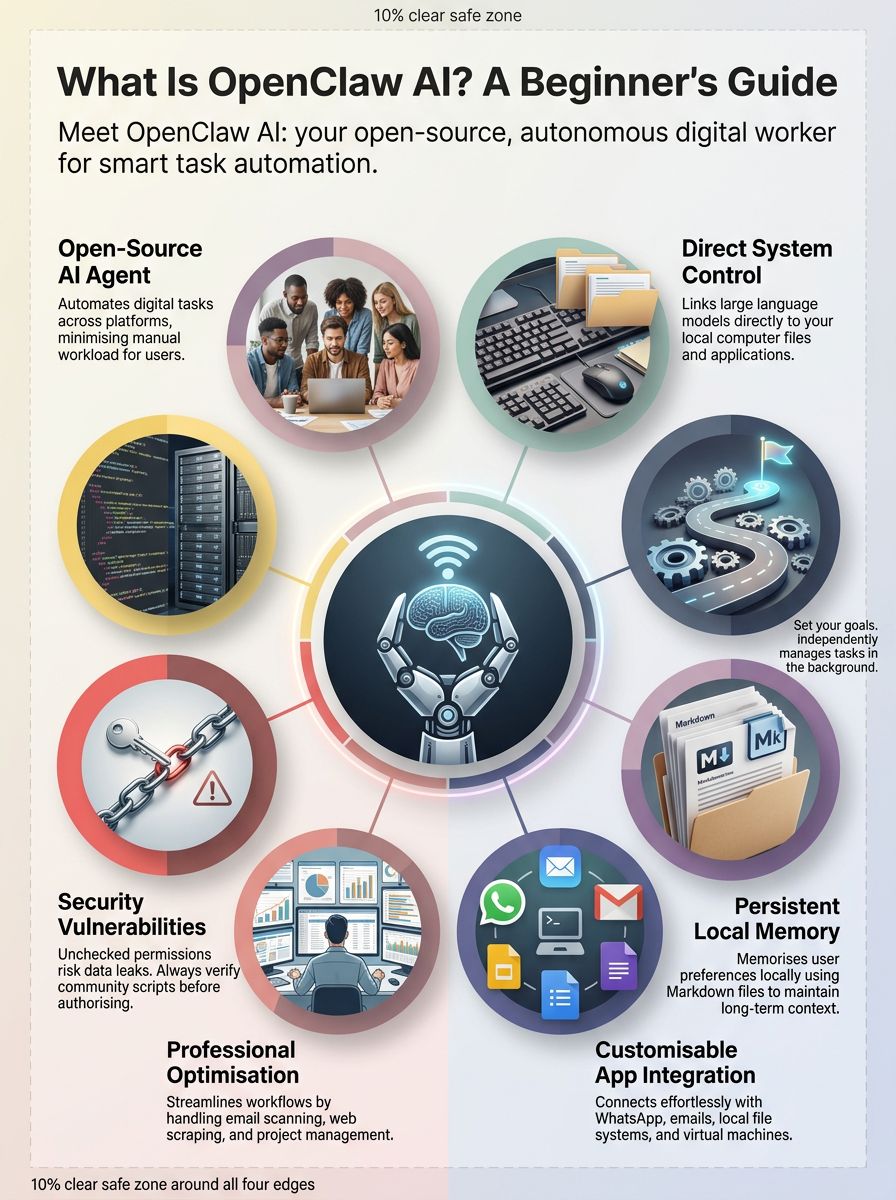
OpenClaw AI operates as a free and open-source personal AI assistant designed to automate digital tasks directly on your computer. Peter Steinberger launched this platform to give users an agentic AI that takes real, unprompted action across multiple applications.
This tool runs natively on Windows, macOS, and Linux. You connect it to email accounts, file systems, or messaging platforms like Microsoft Teams and a Telegram bot. You can deploy it locally via Node.js or DigitalOcean using simple terminal commands.
A 2026 milestone saw OpenClaw reach over 105,000 GitHub stars in just weeks. This explosion in popularity happened because it executes tasks locally using large language models (LLMs), giving users unprecedented control over their local data extraction.
It offers over 100 preconfigured AgentSkills to handle workflows like web scraping, reading the web, and managing backups. It secures your work using strong security architecture features like access control lists and authentication token support in its configuration file.
OpenClaw is not just about talking; it is built to take action across your tools and safeguard your privacy.

How does OpenClaw AI work step-by-step?
OpenClaw AI links large language models to your local file systems and applications. It interprets your prompts and takes direct system actions to complete the job, blending generative ai power with direct system execution.
Here is the step-by-step process of how this autonomous AI agent operates:
- You type a prompt into a webview, terminal, or messaging app.
- The AI evaluates the user context and local environment using the model context protocol and presence information.
- It selects the right open-source skill or shell script to perform the task using familiar formats like HTML or Bash.
- The system assigns specialised autonomous agents to handle coding, research, or complex data extraction.
- These agents execute commands on Windows, Linux, iOS, Android, or virtual machines.
- It transfers data securely via HTTPS and OAuth, using server pushes to update results instantly.
- The tool pulls information from git repositories via SSH keys or messaging apps like Reddit and WhatsApp Business.
- It returns a summary to your inbox or messaging platform.
- Each agent can refine its results by pulling extra context from procedures stored in config files or a browser cookie while maintaining security protocols against prompt injection risks.
- Everything works plug-and-play for daily tasks such as cleaning inboxes or running command-line tools; users simply push a button to trigger workflows every time they need help.

Key differences between OpenClaw and traditional AI tools
OpenClaw AI differs from standard chatbot tools because it executes multi-step actions without asking for permission at every turn. A May 2025 PwC survey showed 79% of US enterprises now run autonomous agents to replace manual clicking and typing.
While older tools require constant supervision, OpenClaw operates independently using local deployment to finish complex, background computing tasks.
How autonomous is OpenClaw AI in decision-making?
OpenClaw AI functions as a highly capable personal AI assistant that makes its own decisions to achieve your goals. You provide a clear objective, like organising your filesystem or handling workflow automation across multiple platforms.
The agentic AI then breaks that goal down into smaller procedures and executes them. Its logic relies on large language models (LLMs) to reason through variable inputs and unexpected errors.
Set the goal, provide access, and let OpenClaw handle the execution.
If a website changes its layout during data extraction, the agent adapts its approach instead of crashing. This autonomy makes it ideal for long-running jobs like updating version control repositories or scanning dashboards.
What long-term memory features does OpenClaw AI have?
Long-term memory allows this AI to remember your preferences and past interactions across all sessions. It uses Supermemory.ai, a powerful external memory engine that processes up to 50 million tokens per user.
This integration ensures the AI remembers your specific formatting rules and project history. It saves these details as Markdown notes on your local drive.
To prevent data loss, it backs up your .clawdbot folder weekly via Windows Task Scheduler. You can also flush old memory files to keep the system running efficiently across messaging platforms and text-to-speech commands.
How does OpenClaw integrate with external tools?
OpenClaw AI links directly with your favourite apps through a modular plugin system. This system allows the agent to control everything from a browser tab to IoT devices at home.
Here is a breakdown of its core integrations:
| Integration Type | Tools & Platforms | Primary Benefit |
|---|---|---|
| Messaging Platforms | WhatsApp, Telegram bot, Slack, Signal | Manage digital tasks remotely via chat. |
| Web & Browsing | WebKit, Brave, Tavily, HTML scrapers | Extract precise information from the web. |
| Email & Scheduling | Nylas, Gmail, Outlook | Link multiple accounts for free inbox sorting. |
For advanced image generation, developers recommend connecting Gemini or Nano Banana Pro using a secure API key.
Main features of OpenClaw AI
OpenClaw AI delivers a programmable digital worker equipped with a deep understanding of prompts and system architecture. It handles complex data formats and offers strong local deployment options.
What is the personalised skill ecosystem?
The personalised skill ecosystem functions as a marketplace of community-built capabilities. These open-source skills let the AI interact with APIs, control your smart home, and manage your WhatsApp integration.
Most installations include over 100 prebuilt AgentSkills right out of the box. You can easily add custom scripts for specific workflow automation needs.
How does OpenClaw understand context better?
OpenClaw uses persistent local memory to track ongoing projects without requiring constant reminders. It logs your conversations and preferences in a secure config file or Markdown document.
A background process called Heartbeat.md reviews this data daily to maintain sharp awareness. It schedules automatic backups to Supermemory.ai at specific intervals throughout the day.
When you start work, the agent automatically loads your current action items and blockers. This local deployment strategy protects your privacy while ensuring the AI understands your specific needs across all chat applications.
Which platforms is OpenClaw AI compatible with?
You can install this open-source AI on Windows, macOS, and Linux operating systems. For secure remote access, Tailscale creates an encrypted SSH tunnel to protect your file systems from security vulnerabilities while you manage tasks remotely.
To run OpenClaw smoothly, you need the right setup:
- Mac Users: Requires macOS 15 or higher and a working Python installation.
- Local Hardware: A Mini PC with 16 GB RAM and an Nvidia N97 GPU works best for local models.
- Cloud Options: Deploy easily on a virtual machine using Node.js or DigitalOcean.
How can OpenClaw AI be used in real life?
OpenClaw AI acts as a dedicated personal assistant for both office professionals and home users. It handles repetitive data extraction, reads emails, and controls smart devices.
How does OpenClaw automate tasks for professionals?
Professionals use this autonomous AI agent to reclaim hours of lost productivity every week. It links directly with project management boards, CRM databases, and communication channels.
Here are the most common professional automations:
- Inbox Management: The AI scans up to six email accounts every hour, filters spam, and drafts replies.
- Lead Generation: Apify extracts fresh leads from the web and pipes the data directly into Pipedrive CRM.
- Daily Briefings: ElevenLabs converts your morning summary, calendar events, and news into a convenient text-to-speech audio file.
- Quality Assurance: Playwright tests user interfaces automatically and logs any errors.
- File Maintenance: Claude Desktop audits your local storage weekly to merge duplicates and delete outdated files.

How can OpenClaw assist with daily personal activities?
You can offload tedious personal chores to OpenClaw so you can focus on more important things. It acts as an always-on digital helper for your home and schedule.
- Smart Home Control: Adjusts thermostats and manages lights based on your location and daily routines.
- Voice Memos: OpenAI Whisper transcribes your voice notes instantly for about $3 per month.
- Web Automation: Logs into websites, fills out shopping lists, and posts social media updates.
- Private Notifications: Sends personal alerts via a dedicated WhatsApp Business number through Sonetel.
- Document Summaries: Reads long PDFs and provides bulleted highlights before your next meeting.
How does OpenClaw improve customer support?
Customer support teams deploy OpenClaw to handle basic queries and reduce response times. A 2026 industry report shows AI agents can cut contact centre costs by up to 40% while improving service quality.
The agent automates repetitive digital tasks, freeing up human staff for complex problems. It extracts data from your CRM to provide instant, accurate answers across messaging apps.
By maintaining continuous uptime via cloud infrastructure, your business can support customers 24/7. This local deployment also ensures sensitive customer data never leaves your secure servers.
What are the risks and challenges of OpenClaw AI?
Giving an artificial intelligence direct access to your computer introduces serious security vulnerabilities. You must carefully manage permissions to prevent data leaks or accidental file deletions.
What security concerns should users be aware of?
Unchecked system access is the biggest threat when using autonomous agents. A simple misconfiguration can allow the AI to delete important project directories or expose your passwords.
In early 2026, cybersecurity researchers discovered over 1,000 unsecured OpenClaw instances leaking private API keys to the public www.
Never run untested community skills on your primary computer; always use an isolated virtual machine.
Prompt injection attacks pose another major risk. A malicious email could trick the AI into forwarding sensitive documents or changing your configuration file.
Always secure your API keys in a local .env file, encrypt your memory folders, and use TLS for web connections.
What ethical issues arise from automation with OpenClaw?
Automating tasks across messaging platforms and file systems brings significant privacy concerns. An autonomous ai agent acting without human oversight can make mistakes with real-world consequences.
If the AI misinterprets a command, it might send an inappropriate message on LinkedIn or delete a critical database. Using open-source AI tools with large language models (LLMs) requires strict accountability. You must always review the agent's actions and limit its access to sensitive financial or personal data so you do not compromise your vm or virtual machine.
Is OpenClaw AI suitable for you?
Deciding to use OpenClaw depends heavily on your technical comfort level and your specific automation goals. This powerful tool requires proper setup and maintenance to run safely.
Is OpenClaw AI beginner-friendly?
Peter Steinberger designed OpenClaw AI for power users and developers, making it challenging for absolute beginners. The onboarding process requires familiarity with terminal commands, API keys, and system permissions.
While it offers incredible workflow automation, the steep learning curve deters many casual users. If you simply want a basic chatbot to answer questions, consumer-grade tools like Claude Sonnet or standard ChatGPT are much safer and easier to use. OpenClaw appeals most to technical users who want to build highly specific personal AI assistants.
How do you evaluate if OpenClaw fits your needs?
To determine if this tool is right for you, map out your exact automation goals and budget. Compare the cost of running local models versus paying for API access.
Consider these key factors before installing:
- Use Case: Do you need complex data extraction and filesystem access, or just simple text generation?
- Budget: Running models like Claude Opus costs around $60 per month, while local deployment on a strong PC has high upfront hardware costs.
- Security Tolerance: Are you comfortable managing your own security architecture to prevent prompt injection attacks?
If you require deep system integration and have the technical skills to manage it, OpenClaw is an unmatched open-source solution.
Conclusion
OpenClaw AI redefines what artificial intelligence can accomplish by taking direct action on your computer.
As a highly capable autonomous AI agent, it connects seamlessly with your file systems, messaging platforms, and virtual machines.
This tool streamlines your daily routine, letting you automate tedious digital tasks with ease.
While you must remain vigilant about security vulnerabilities, the productivity benefits are massive.
If you want a personal AI assistant that truly works for you, exploring this open-source AI is your next best step.
FAQs
1. What is OpenClaw AI and who created it?
Developed by Peter Steinberger, OpenClaw is an open-source AI platform that gained massive popularity across the US tech sector in early 2026 for using large language models (LLMs) to power highly capable autonomous agents. This artificial intelligence system enables users to automate complex digital tasks natively on their own devices.
2. How does OpenClaw AI work with local deployment and file systems?
Local deployment allows you to run the software directly on your personal computer or virtual machines, ensuring your sensitive data remains entirely on your own infrastructure. By granting the system access to your local file systems, you can achieve continuous data extraction and workflow automation without relying on external cloud providers.
3. Can OpenClaw AI act as a personal assistant or integrate with WhatsApp?
Yes, OpenClaw functions as a proactive personal AI assistant that features native WhatsApp integration, allowing you to trigger background tasks and manage your schedule entirely through chat commands.
4. What are agentic ai and autonomous ai agents in the context of OpenClaw?
Agentic AI represents a shift from chatbots that simply return text to systems that independently execute your instructions. Within this framework, an autonomous AI agent acts directly on your behalf, operating your local applications and performing multi-step actions without requiring constant supervision.
5. Are there security vulnerabilities when using open-source AI like OpenClaw?
Giving any application unrestricted access to your system carries inherent security vulnerabilities, and cybersecurity researchers noted in early 2026 that community-shared plugins can sometimes contain malicious code. You must carefully audit any third-party extensions before installing them and isolate experimental tasks to prevent unauthorised access to your private information.
References
- https://www.digitalocean.com/resources/articles/what-is-openclaw (2026-01-30)
- https://www.turingcollege.com/blog/openclaw (2026-01-30)
- https://www.linkedin.com/pulse/what-openclaw-simple-guide-ai-can-actually-use-your-computer-sn2mf
- https://medium.com/data-science-in-your-pocket/dont-use-openclaw-a6ea8645cfd4
- https://openclaw.ai/
- https://www.tencentcloud.com/techpedia/141568