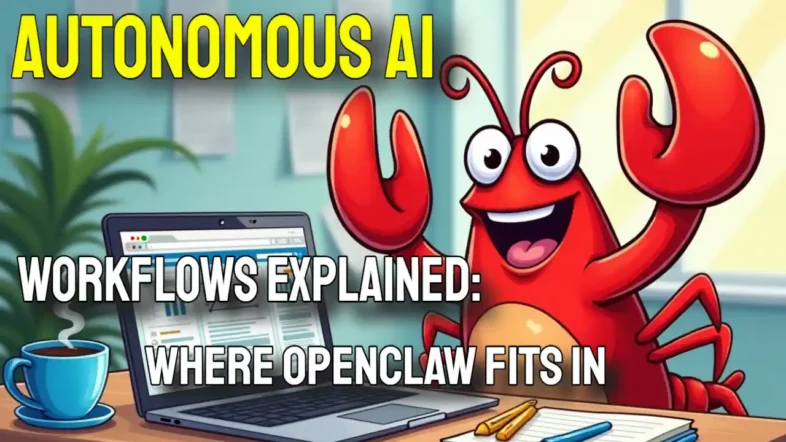
Connecting your chatbot to system tools and sorting your inbox for autonomous AI workflows requires a specific technical setup, as we will discuss in this explanation workshop for Autonomous AI Workflows.
Most people want an AI agent that takes direct action, rather than one that just answers basic questions.
This is where true workflow automation changes how you manage your daily computing tasks.
By leveraging an autonomous AI agent, you can control your Mac Mini or PC locally without sending private data to the cloud.
OpenClaw is a free, open-source project that recently surpassed 100,000 GitHub stars in February 2026. It allows you to run large language models, such as Claude AI or GPT-4o, directly on your machine.
The software smoothly links to messaging platforms, supporting everything from Discord integration to Google Calendar syncing. We will break down exactly how this Node.js system functions and give you the insider strategies to build smarter automated behaviours.
You will learn how to automate repetitive work on Reddit or WhatsApp Business, manage privacy controls, and secure your local infrastructure against prompt injection vulnerabilities.
Autonomous AI Workflows – Key Takeaways
- OpenClaw is a free, open-source framework that runs autonomous agents locally on devices like a Mac Mini or PC.
- The five-part architecture keeps your data off the cloud by relying on local storage at 127.0.0.1:18789.
- Security requires strict attention. A 2026 Cisco report highlights that agentic AI projects face high prompt injection risks without proper tool policy engines.
- Unlike LangChain's enterprise focus, OpenClaw specialises in direct, personal task execution through messaging platforms like Telegram and WhatsApp.
- Setup demands Node.js v22+ and manual API key configuration, making a centralised environment file essential for stability.
What Is OpenClaw?

OpenClaw is a free, open-source framework built by Peter Steinberger. It helps you run highly capable autonomous AI agents directly on your own computer.
The platform connects securely with Slack, Telegram, Discord, and WhatsApp to orchestrate complex digital jobs. It links effortlessly to LinkedIn, file systems, and local shell commands.
In early 2026, the project moved to an open-source foundation after its creator joined OpenAI. This transition gives it massive community backing, making it a reliable choice for your long-term automation needs.
What are the core principles of OpenClaw?
Agents in OpenClaw act as persistent digital workers capable of managing ongoing workflows. They maintain an active session state, meaning conversations and task progress continue seamlessly over time.
They connect directly with messaging platforms like Slack, WhatsApp, and Telegram to execute real tasks.
The architecture relies on a structured skills system. You store these skills in local directories containing a SKILL.md file with metadata and tool instructions.
Here are the core principles driving the software:
- Containerised Execution: The system acts as a runtime and performs exceptionally well inside Docker or Kubernetes clusters.
- Secure Enclaves: It supports Trusted Execution Environments through partners like NEAR AI, allowing you to run tasks securely without exposing credentials.
- Hardware Flexibility: It supports GPU acceleration for heavy processing but runs smoothly on CPU-based devices like a Mac Mini or Windows PC.
- Execution Continuity: Persistent behaviour management takes priority, ensuring real tasks get completed instead of just generating text.
What does OpenClaw not do?
OpenClaw does not guarantee perfect, predictable outcomes without human supervision. Task execution can fail quietly.
There is no built-in health monitoring or alert system for unexpected outages. This means you must check the logs manually to verify success.
“As of early 2026, industry reports from groups like Gartner show that 40% of enterprise agentic AI projects risk cancellation due to a lack of governance and observability. You must keep a human in the loop.”
The default setup lacks strict sandboxing. Without careful configuration, it exposes your local infrastructure to prompt injection attacks and unauthorised shell commands.
You will need programming skills to navigate the initial macOS or virtual machine setup, as it does not offer a simple plug-and-play installer.
How OpenClaw Functions
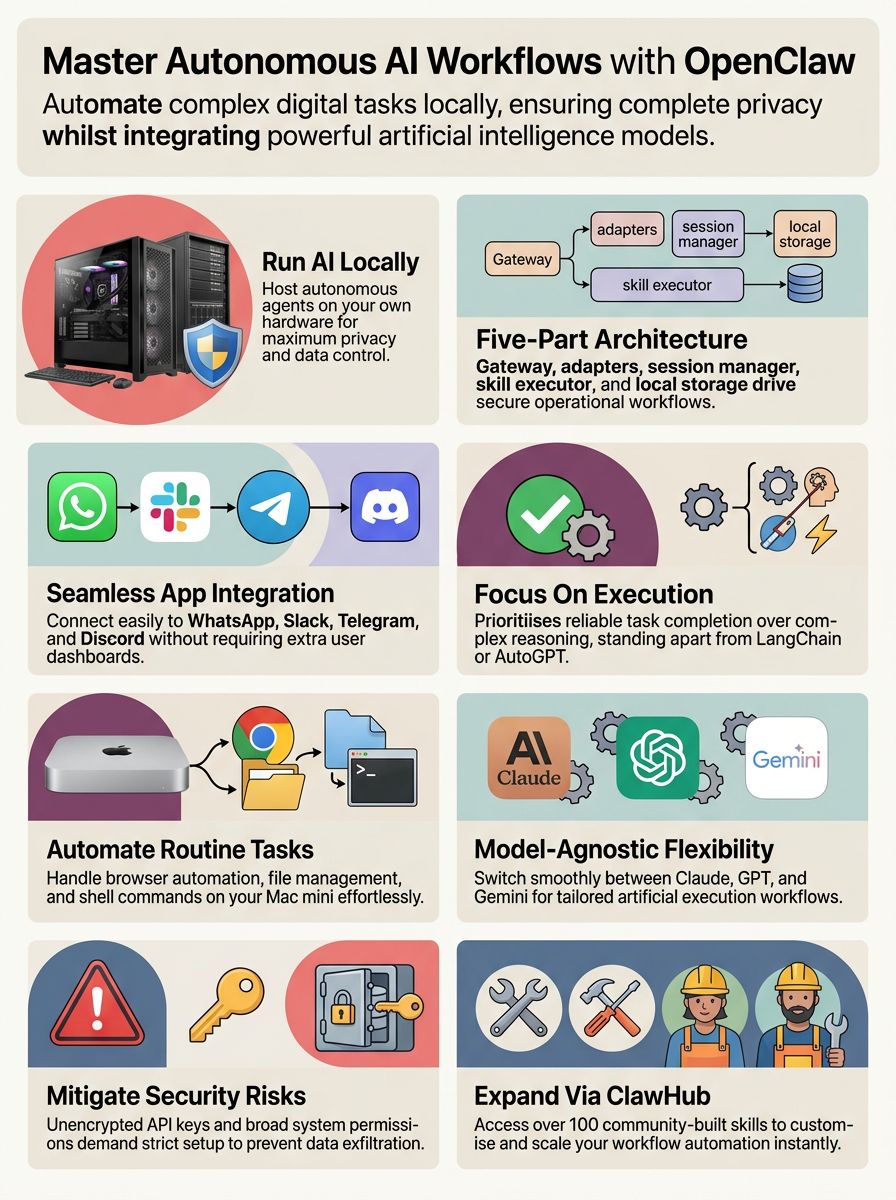
OpenClaw relies on a clear, five-part structure to coordinate its tasks. This architecture enables the AI to process commands from messaging platforms and execute them securely.
The system translates simple chat messages into actionable shell commands and browser automation sequences.
Overview of the five-component architecture
The framework divides responsibilities across five distinct layers to maintain security and speed. Each component handles a specific part of the execution pipeline.
- The Node.js Gateway: This acts as the command centre, controlling message routing and task execution between the user and the agent.
- Channel Adapters: These normalise inputs from over 20 messaging platforms, ensuring WhatsApp, Telegram, Discord, and Slack commands all look the same to the core engine.
- Session Manager: This stores unique context for every user, keeping conversations separate to protect privacy on shared local infrastructure.
- Skill Executor: This runs over 100 built-in ClawHub extensions, managing terminal commands, API calls, and data visualisations.
- Local Storage: All interaction histories sit securely on your host machine at 127.0.0.1:18789.
A crucial insider tip for setup is to keep your gateway authentication token strictly in your environment variables. Never hardcode this token in your configuration file, as it creates an immediate local vulnerability.
How does the ReAct reasoning loop work?
The ReAct reasoning loop is the intelligence engine behind the agent's actions. The system first reads a user command from a connected messaging app like WhatsApp.
It normalises the input, checks the session history, and consults a large language model like Claude 3.5 Sonnet or GPT-4o. The model plans the next move, such as gathering research through a browser or executing a shell command.
Each step logs directly into the local state memory. If a shell command fails, the loop allows the agent to recognise the error, rethink its approach, and try a different command automatically.
OpenClaw vs. Other AI Frameworks
Choosing the right artificial intelligence tool depends entirely on your end goals. OpenClaw focuses heavily on simple configuration and direct execution via messaging apps.
Here is how it measures up against the leading alternatives in 2026.
How does OpenClaw compare to AutoGPT?
AutoGPT focuses on unsupervised, long-running background tasks. It famously pioneered the autonomous agent concept, reaching over 167,000 GitHub stars by relying heavily on continuous iterative planning.
OpenClaw keeps the user tightly in the loop, acting as a direct assistant rather than an independent researcher.
| Feature | OpenClaw | AutoGPT |
|---|---|---|
| Primary Interface | Messaging apps (WhatsApp, Slack) | Command Line Interface (CLI) |
| Execution Style | Interactive, user-guided steps | Fully autonomous, unsupervised loops |
| Data Hosting | 100% Local infrastructure | Often relies on external cloud APIs |
If you want an assistant you can chat with naturally on your phone while it works, OpenClaw is the superior choice. AutoGPT is better suited for background research tasks that you check on hours later.
How does OpenClaw differ from LangChain?
LangChain provides the intelligence layer for complex enterprise applications. It boasts over 600 native integrations and uses sophisticated state machines to manage deep data retrieval.
OpenClaw operates specifically at the execution layer for personal computing tasks. Key differences include:
- Focus: LangChain builds complex enterprise intelligence; OpenClaw handles direct personal task execution.
- Integrations: LangChain offers broad corporate connections; OpenClaw excels at real-time browser and local Discord API control.
- Setup: LangChain requires massive development overhead; OpenClaw is lighter and faster for basic computer automation.
What sets OpenClaw apart from CrewAI?
CrewAI specialises in multi-agent collaboration. It uses a distinct two-layer architecture containing “Crews” for autonomy and “Flows” for control, allowing multiple AI personas to coordinate on complex projects.
OpenClaw focuses on deterministic workflow automation with a single, highly capable agent. It handles direct tasks, like updating CRM records or writing files, with extreme precision.
Use CrewAI if your project requires a simulated team of experts debating a topic. Use OpenClaw if you need a reliable, solitary digital worker to sort your inboxes and execute precise shell commands.
Real-World Applications of OpenClaw
OpenClaw automates the exact computing tasks that slow down your daily productivity. It functions best when tied to repeatable, high-volume actions.
By relying on your local infrastructure, it executes these tasks without paying per-minute cloud computing fees.
How can OpenClaw be used in data analysis and visualisation?
OpenClaw automates the extraction, organisation, and formatting of raw data. The agent can clean messy CSVs using pandas and generate updated Pivot Tables automatically.
“According to a 2026 AdAI research report, small businesses report a 35% average reduction in operational costs when adopting this type of data workflow automation.”
By connecting your local spreadsheets to the agent, you can prompt it via Slack to build executive dashboards instantly. This eliminates hours of manual data entry and formatting.
How does OpenClaw automate operational tasks?
OpenClaw handles tedious jobs like scheduling, client communications, and invoicing in the background. It functions as an always-on assistant running natively on your dedicated machine.
“A 2026 Salesmate report indicates that deploying AI agents in customer operations and sales workflows yields up to a 250% average ROI within 18 months.”
Many independent contractors use it specifically to automate lead generation. You can set up a skill to parse incoming emails, extract key client details, and format them directly into your database.
Benefits of Using OpenClaw
Running an open-source AI agent on your own hardware provides distinct advantages over locked-in corporate solutions. You retain complete control over both your costs and your data privacy.
What are the model-agnostic capabilities of OpenClaw?
OpenClaw lets you freely switch between different large language models (LLMs) depending on the job. Popular configuration choices include:
- GPT-4o: Best for complex coding, reasoning, and system configuration logic.
- Claude 3.5 Sonnet: Excellent for natural language tasks and fast email summarisation.
- NVIDIA Nemotron: Ideal for completely offline, secure processing via Ollama.
This flexibility ensures your workflow automation never stops, even if a public cloud API goes down.
How does OpenClaw enhance privacy and control?
OpenClaw keeps your personal data, chat memory, and files strictly on your local device. Each session remains isolated by channel, ensuring your WhatsApp integration data never mixes with your Slack messages.
You can enhance this security further using open-source additions. Tools like NVIDIA NemoClaw install policy-based privacy guardrails using the OpenShell runtime.
These guardrails give you total control over how the agent handles sensitive information. You can process confidential client files locally without violating privacy agreements or leaking data to a central server.
What makes OpenClaw scalable and flexible?
The system relies on a massive library of modular skills. The ClawHub registry provides over 100 community integrations, letting you add Telegram functionality or direct file management in seconds.
- Hardware Scaling: It runs efficiently on a home Mac Mini, but easily scales up to dedicated RTX workstations.
- Cloud Deployment: For 24/7 availability, you can deploy it on an Amazon Lightsail instance.
- Cross-Platform: It operates natively across macOS, Windows, and Linux environments.
Potential Challenges with OpenClaw
Running artificial intelligence directly on your file system introduces unique risks. If an agent has permission to write files, it also has permission to delete them.
You must address these security and setup hurdles before trusting the system with sensitive tasks.
What security risks exist in default OpenClaw installations?
Default installations contain severe vulnerabilities if exposed directly to the open internet. Cisco's 2026 State of AI Security report explicitly warns that agents with expansive execution privileges face massive exploitation risks.
- Gateway tokens and API keys sit unencrypted in default configuration files.
- Third-party ClawHub skills run without central verification, risking the introduction of malicious code.
- A lack of strict system permissions makes data exfiltration via prompt injection highly probable.
You must implement a tool policy engine to enforce allowlists, blocking the agent from accessing critical system files.
What operational setup and maintenance challenges does OpenClaw have?
Getting the system to run reliably requires significant technical patience. Inexperienced teams often face a steep learning curve, adding significant time and cost just navigating the configuration steps.
- You must install Node.js v22 or higher, as older versions block the installation entirely.
- Each messaging platform demands unique authentication steps, meaning Discord setup looks completely different from Telegram.
- Memory storage files risk corruption if interrupted during heavy write operations.
A highly recommended practice is to create a secure, centralised environment file to manage all your tokens and prevent configuration drift during system updates.
The Future of Autonomous AI with OpenClaw
The role of local AI agents is expanding rapidly. As computing power increases, these tools will handle increasingly complex tasks without human intervention.
OpenClaw represents the leading edge of this shift toward personal, programmable digital workers.
How will OpenClaw expand its skill ecosystems?
The recent transition of the project to an open-source foundation will drastically accelerate community contributions. Developers are rapidly expanding the ClawHub registry with new capabilities.
“Expect a surge in multi-agent workflows. Tools like Moltbook will soon allow several specialised AI models to collaborate seamlessly within the OpenClaw environment.”
As the community grows, you will find verified integrations that can easily replace expensive software subscriptions for email marketing and calendar management.
How will OpenClaw integrate with emerging AI tools?
Gartner forecasts that 40% of enterprise applications will embed task-specific AI agents by the end of 2026. OpenClaw is uniquely positioned to act as the local bridge between edge computing devices and powerful cloud-based frontier models.
Enterprises use this architecture to combine physical AI workloads with traditional software. The platform's flexible design allows you to pair emerging tools from machine learning startups directly with your existing local infrastructure.
Familiarising yourself with the SKILL.md format today will prepare you for the upcoming shift toward fully agentic software interfaces.
What is OpenClaw? A Simple Explanation for Beginners
OpenClaw is an autonomous AI agent that acts as a hands-on digital worker. Instead of just chatting with you, it opens applications, manages files, and sends commands through your computer's terminal.
It is an extremely powerful tool for anyone looking to eliminate repetitive computing chores.
- It connects to your favourite apps: You can text it via WhatsApp or Slack to execute tasks on your PC.
- It works locally: The software runs on your own hardware, protecting your sensitive data from the cloud.
- It requires technical setup: You will need basic command-line knowledge to configure the initial system permissions safely.
Conclusion
Autonomous AI agents provide a massive advantage for managing complex daily workflows.
OpenClaw stands out by offering absolute control over your local infrastructure.
You can run it on a Mac Mini, connect it to your preferred messaging platforms, and automate heavy data analysis tasks securely. By supporting diverse models like Claude AI or GPT-4o, the framework adapts instantly to your specific needs.
As the technology matures, mastering these open-source tools will give you a significant edge in personal and professional productivity.
FAQs for Autonomous AI Workflows – Explained
1. What are autonomous AI agents, and how do they support workflow automation?
Autonomous ai agents use artificial intelligence to manage tasks without constant human input. By the end of 2026, Gartner projects that over 30 percent of US enterprise applications will embed these tools to run shell commands and slash operating costs. They streamline workflow automation directly, saving teams thousands of manual hours every month.
2. How does OpenClaw integrate with messaging platforms like Slack, WhatsApp, Telegram, and Discord?
OpenClaw provides direct slack integration, whatsapp integration, telegram integration, and discord integration through its latest 2026 provider plugins, allowing US teams to trigger automated workflows directly from their favourite chat apps.
3. What security vulnerabilities should I consider when using local infrastructure for AI-powered task execution?
You must actively defend against prompt injection, which leads the list of top OWASP security vulnerabilities in 2026. When running ai agents on local infrastructure like a Mac mini, attackers can manipulate system permissions to trigger data exfiltration. Using strict isolation prevents malicious prompts from accessing sensitive US user data during task execution.
4. Can OpenClaw help visualise data during workflow automation processes?
Yes, OpenClaw features data visualisation tools like the recent March 2026 Dashboard v2 update. This interface provides live metrics bars and cost breakdown donut charts to help you track performance. These visualisations show US businesses exactly how much compute the autonomous ai agent consumes during task execution.
5. Why is conversational AI important in modern browser automation tools like OpenClaw?
Conversational ai allows you to command complex browser automation simply by chatting naturally in your messaging platforms. Using technology like openai's GPT-5.4 model, the system interprets your plain text instructions to browse US websites and extract data instantly. This eliminates manual configuration and makes artificial intelligence accessible to any user.
References
- https://www.yottalabs.ai/post/what-is-openclaw-the-autonomous-ai-assistant-that-actually-takes-action (2026-02-18)
- https://medium.com/data-science-in-your-pocket/dont-use-openclaw-a6ea8645cfd4
- https://www.hireoverseas.com/blogs/openclaw-vs-langchain
- https://www.hireoverseas.com/blogs/openclaw-vs-crewai
- https://emergent.sh/learn/what-is-openclaw
- https://www.cyberark.com/resources/blog/how-autonomous-ai-agents-like-openclaw-are-reshaping-enterprise-identity-security
- https://www.bitsight.com/blog/openclaw-ai-security-risks-exposed-instances
- https://blog.cyberdesserts.com/openclaw-malicious-skills-security/
- https://medium.com/@gwrx2005/proposal-for-a-multimodal-multi-agent-system-using-openclaw-81f5e4488233
- https://www.researchgate.net/publication/401912896_Examining_Users%27_Behavioural_Intention_to_Use_OpenClaw_Through_the_Cognition–Affect–Conation_Framework
- https://www.ml6.eu/en/blog/openclaw-what-the-hype-around-autonomous-ai-agents-actually-means-for-enterprise
- https://www.researchgate.net/publication/401912896_Examining_Users%27_Behavioural_Intention_to_Use_OpenClaw_Through_the_Cognition–Affect–Conation_Framework/download
- https://www.linkedin.com/pulse/what-openclaw-simple-guide-ai-can-actually-use-your-computer-sn2mf
- https://www.turingcollege.com/blog/openclaw (2026-01-30)