Setting up a personal AI assistant often feels restricted by confusing cloud platforms. OpenClaw flips this model entirely.
This open-source system gained over 180,000 GitHub stars in less than two months. It gives you direct control of your own AI agent across multiple messaging platforms like WhatsApp, Telegram, and Slack. You keep your data private while automating real tasks.
This guide will break down exactly what these components mean. We will show you the insider strategies to build a secure configuration. You will gain the confidence to deploy a highly capable agent on your own hardware.
Key Takeaways
- OpenClaw is an open-source AI assistant platform that lets users control their own data while connecting to messaging platforms like Slack, WhatsApp, and Telegram.
- The Gateway Control Plane acts as a central hub for secure session management, strict access control, and token authentication.
- The system uses modular channel adapters, SQLite databases for memory, and Docker-based sandboxing to execute tools safely.
- Security features include local gateway binding, SSH routing, persistent credential storage, and explicit device pairing approvals.
- You can deploy OpenClaw locally on macOS or Linux, run it via Kubernetes containers, or use cloud hosting for scheduled automation and voice commands.
What is the OpenClaw Architecture?

OpenClaw works like an operating system for ai agents using a hub-and-spoke pattern. Austrian developer Peter Steinberger originally created the project under the name Clawdbot. He renamed it after Anthropic raised trademark concerns in early 2026.
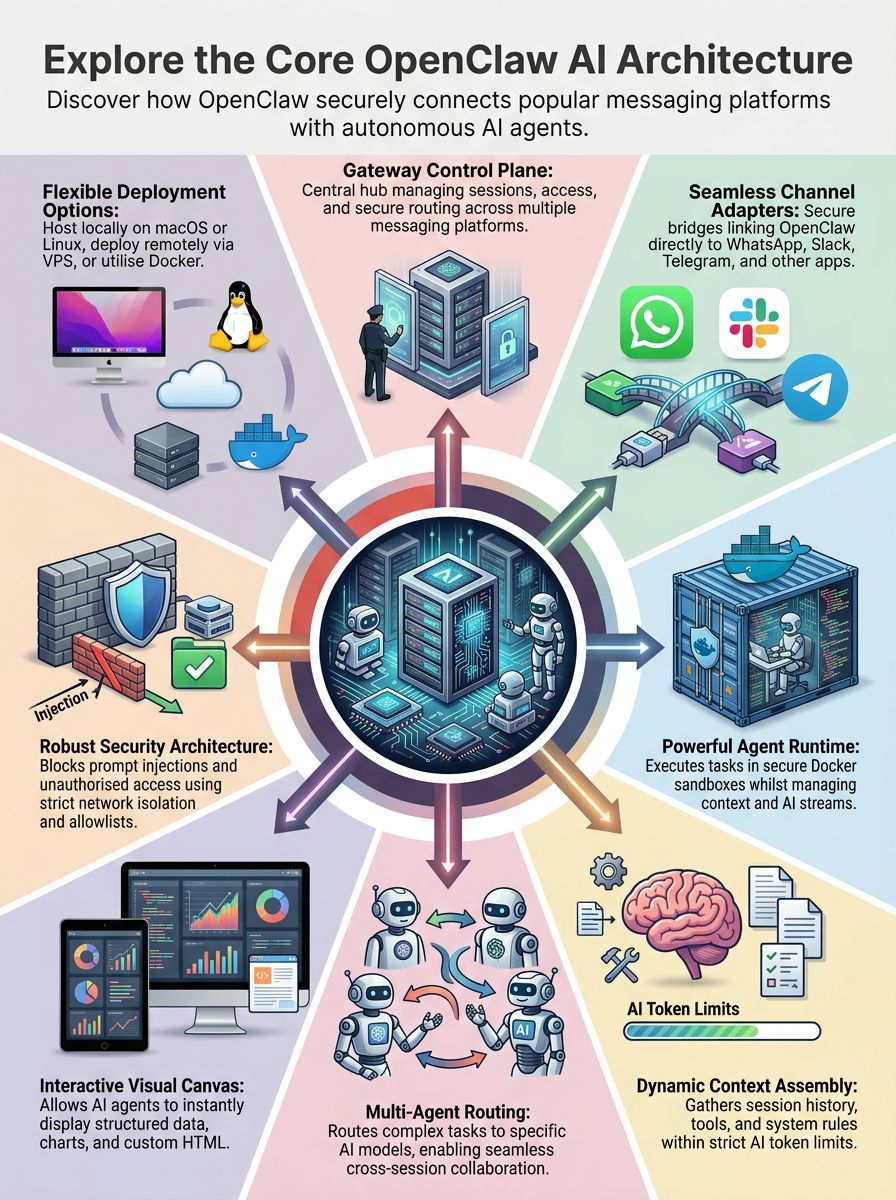
The Gateway acts as the central control plane. It is built as a WebSocket server to link messaging platforms like Slack with the Agent Runtime. This setup manages user input and session resolution across mobile nodes running Android or iOS.
The architecture prioritises local execution to keep sensitive information completely private.
Security sits at its core. Network security remains tight with tls encryption and strict session boundaries. Agents automate shell commands safely through isolated sandboxing.

Core Components of OpenClaw
OpenClaw brings together channel adapters, control interfaces, and an agent runtime. These elements support smooth communication across messaging tools like Slack and Microsoft Teams.
The gateway control plane connects everything from virtual machines to mobile nodes in real time.
What are Channel Adapters and How Do They Work?
Channel adapters serve as bridges between OpenClaw and external messaging platforms. Code directories provide these adapters for apps like WhatsApp, Telegram, Discord, and iMessage.
These modules interpret inbound messages from users. They then structure outbound replies to match the specific platform.
A few popular platform integrations include:
- Discord and Telegram: Used heavily by developers for quick command execution.
- Slack: Favoured by corporate teams for workflow automation and alert monitoring.
- Moltbook: The viral AI-only social network created by Matt Schlicht relies on these adapters for agent communication.
How Do Control Interfaces Function in OpenClaw?
Control interfaces give users the power to oversee chat sessions and adjust settings. The system offers entry points through a CLI powered by Commander.js and a Lit-based Web UI.
These interfaces let you watch live messages, manage agentic AI assistants, or switch between actions. You can monitor file operations directly from your local network at http://127.0.0.1:18789/.
High-end configurations like AMD's RyzenClaw allow you to compile and run these CLI tools in under an hour.
What Is the Role of the Gateway Control Plane?
The Gateway Control Plane acts as the main hub for session management and access control. It binds to local port 18789 using Node.js to support secure authentication.
This element prevents WhatsApp session conflicts by keeping a strict limit of one Gateway per host. The tech industry recognised this value quickly. In March 2026, Nvidia introduced NemoClaw to wrap this gateway in an “OpenShell” for strict enterprise guardrails.
The Control Plane handles routing messages between users and the Agent Runtime system. It manages event ingestion and large language models efficiently.
| Feature | Function |
|---|---|
| Local Binding | Restricts access to 127.0.0.1 to prevent outside attacks. |
| Event Routing | Directs requests from mobile nodes to the correct agent. |
| Access Guardrails | Requires explicit pairing before allowing remote commands. |
How Does the Agent Runtime Operate?
Agent Runtime works at the centre of the system to manage context assembly and streaming responses. It pulls data from models like Anthropic Claude, OpenAI GPT, or local machine learning engines.
Every agent executes tasks inside a secure Docker-based sandbox. This isolation is crucial. Early users gave agents unrestricted access, which led to accidental malware installations and costly mistakes.
The runtime supports tool calls with shell commands while saving session states to disk. Users get seamless access to semantic search features across local filesystems. Local models like Qwen 3.5 35B run beautifully here for complete privacy.
Key Functional Processes
Clever session handling and a steady execution loop shape how this platform works day-to-day. These systems keep everything running smoothly on messaging platforms or across the web.

How Is Session Resolution Handled?
OpenClaw assigns session IDs by context. A main session might look like agent:12:main, while a direct message uses agent:19:web:dm:user123.
This granular tracking ensures that each conversation remains separate. Main sessions unlock full abilities like browser automation or file operations.
Session logs live locally to provide total control.
- Append-Only Files: Logs are stored securely in
~/.openclaw/sessions/. - SQLite Databases: Each agent links back to its own database for hybrid semantic search.
- Markdown Storage: Preferences and memories are kept as plain text Markdown rather than proprietary blobs.
What Is Context Assembly and Why Is It Important?
Context assembly shapes what the AI system understands during each session. It gathers the system prompt, rules from static files, and recent conversation history.
This unique context is constrained by the model's token limit. Advanced local hardware setups, like AMD Ryzen AI Max+ systems, can manage massive context windows up to 260,000 tokens.
Plugins can override older engines to create custom memory strategies. Fast commands let users inspect active data so they stay in control during complex browser automation tasks.
How Does the Execution Loop Work?
Each execution loop runs through four distinct steps. It begins with context assembly, moves to model invocation, follows with tool execution, and ends by saving the state.
Running continuous loops with paid APIs can become expensive. A highly active agent can easily consume $10 to $15 a day in API costs if unrestricted.
Latency targets remain tight across the entire loop.
| Process Step | Target Latency |
|---|---|
| Access Control Check | Under 10ms |
| Session Loading | Under 50ms |
| Prompt Preparation | Under 100ms |
| Bash Script Execution | Under 100ms |
Interaction and Multi-Agent Coordination
The platform links personal AI assistants to help them work together seamlessly. Semantic search and Slack integration make complex tasks feel intuitive.
How Do Canvas and Agent-to-UI (A2UI) Communications Work?
Canvas and A2UI communications create a visual experience at port 18793. This workspace lets agents display structured data and dynamic charts directly to users.
Agents use Canvas for complex workflows involving browser automation. Each update appears instantly, so feedback flows smoothly between the agent and the user interface.
What Are Voice Wake and Talk Mode?
Voice Wake and Talk Mode let users start hands-free interactions by saying a wake phrase. Voice input works smoothly on messaging platforms and desktop systems.
The system uses advanced speech synthesis and transcription for clear communication.
- ElevenLabs Integration: Powers highly realistic voice responses.
- Push-to-Talk: Offers a controlled alternative to always-on listening.
- Conversational Actions: Triggers file operations or visualisations using just your voice.
How Is Multi-Agent Routing Managed?
Multi-agent routing directs tasks to the right agent using precise channel mapping. You can assign Discord messages to Claude Sonnet and route Telegram queries to GPT-4.
Each agent stays in an isolated session workspace. Advanced local setups can run up to six concurrent agents simultaneously without relying on cloud servers.
Session tools allow these isolated assistants to collaborate. They can list all active sessions or spawn new agents for bigger workloads.
What Are Scheduled Actions and External Triggers?
Scheduled actions let agents work entirely on their own. The heartbeat scheduler keeps tasks running at set times for regular status checks.
Users frequently connect webhooks to messaging platforms or email clients. A failed deployment on GitHub can automatically trigger an agent to investigate and report the error to Slack.
Developers use these features to build assistants that handle file operations without manual input.
Security Architecture
Security forms the absolute backbone of this framework. A compromised agent means a compromised machine.
Clever mechanisms protect messaging platforms from threats. These defences keep browser automation and shell commands safe for every session.
How Is Network Security Ensured?
The gateway binds to a local IP address by default to limit unnecessary exposure. Remote work requires secure HTTPS routes using SSH tunnels or Tailscale.
Network isolation blocks unwanted threats before they begin.
- Persistent Storage: Credentials stay safe with strict
0600file permissions. - Container Defences: Virtual machines add a necessary wall of defence.
- Exposure Risks: In February 2026, researchers found over 42,000 public instances vulnerable because users skipped basic SSH protections.
What Are Authentication and Device Pairing Methods?
Authentication covers both token and password methods to secure assistants across mobile nodes. Device pairing uses a clear approval process before any remote connection becomes active.
This strict verification is absolutely essential. A misconfigured database on the Moltbook platform exposed 1.5 million agent API tokens in late January 2026.
Each new device must receive explicit permission using the Web UI or CLI. Once approved, the system issues a persistent device token that enables secure ongoing access.
How Is Channel Access Controlled?
Allowlist policies dictate exactly who gets to join conversations on platforms like Slack. Teams and users undergo checks against set lists before they can interact with the system.
Group mention gating further limits agent replies. Agents answer only if someone uses an explicit group tag.
Channel-specific controls let you fine-tune permissions. You can block unwanted requests while supporting secure file operations and semantic search queries.
How Does OpenClaw Defend Against Prompt Injection?
The system applies context isolation to stop prompt injection from affecting sessions. Tool execution always runs inside Docker sandboxing.
I have found that malicious emails are a primary attack vector. Trend Micro highlighted “Indirect Prompt Injection” as a major risk, where an agent reads a poisoned email and executes a hidden command weeks later.
Policy layers decide exactly what actions are allowed for agents. The system scans all links and file attachments before they ever reach the core AI models.

Deployment Options
You can run the framework on a laptop, in the cloud, or inside Docker containers. Discover which setup fits your needs best as you move forward.
How to Set Up Local Development?
Setting up local development is simple and fast on macOS and Linux.
- Ensure your device has at least 2GB RAM for chat features, or 4GB memory for browser automation.
- Start the CLI installation by running
curl https://openclaw.ai/install.sh | bashin your terminal. - Begin onboarding with the command
openclaw onboard --install-daemonto prepare the assistant. - Verify the Gateway service is running by entering
openclaw gateway status. - Visit
http://127.0.0.1:18789to reach the visual dashboard and manage your shell commands.
What Are Remote Gateway Deployment Options?
Remote gateway deployment gives your assistant the reach to serve users from anywhere.
- AWS Integration: Amazon Web Services introduced an Amazon Lightsail blueprint in March 2026 using a 4GB memory plan.
- VPS Hosting: Virtual machines from providers like Hetzner start at just £4 per month.
- Secure Tunnels: Tailscale provides private remote control without exposing public ports.
- macOS Backgrounding: LaunchAgent helps mobile nodes run the software quietly in the background.
How Do Container-Based Deployments Work?
Containers make deployment fast, reliable, and highly scalable.
- Docker packages key AI parts with all needed software inside an isolated environment.
- Kubernetes manages these containers to handle load balancing across remote servers.
- The NVIDIA Kubernetes Device Plugin allocates GPU resources efficiently for heavy tasks.
- Persistent storage systems keep model checkpoints safe so upgrades never wipe your data.
What Makes OpenClaw AI Different from Traditional AI Tools?
Most AI assistants just suggest actions and wait for your input. This system automates workflows independently using scheduled actions and shell commands.
You can trigger file operations or direct a support bot to launch on Slack in 20 minutes. Multi-agent routing lets several models work together across multiple channels simultaneously.
The broader tech landscape recognises this massive potential. The Meta acquisition of the Moltbook agent network for $14.8 billion proved that autonomous agent ecosystems hold immense value.
Users achieve tangible real-world results. Notable wins include negotiating a $4,200 car discount and successfully contesting insurance denials automatically.
Conclusion
OpenClaw stands out as a highly capable personal AI assistant. It connects smoothly with WhatsApp, Telegram, and other messaging platforms while keeping your private data secure.
This blend of session handling, message routing, and strong network security creates a thriving environment for multi-agent systems. You can leverage semantic search and browser automation to bring advanced capabilities directly into everyday chat apps.
With rapid growth on GitHub and versatile deployment options, the platform fundamentally changes daily workflow automation. It proves that a secure, locally controlled architecture is the future of artificial intelligence.
FAQs
1. What are the main features of the OpenClaw AI system?
OpenClaw functions as an autonomous agent that uses multi-agent routing to isolate different tasks into distinct workspaces. The system completes real work on your machine by performing shell commands, executing file operations, and running browser automation.
2. How does OpenClaw connect with messaging platforms like Slack?
The local Gateway layer manages seamless Slack integration alongside connections to twenty other messaging platforms. This architecture allows your personal ai assistant to read messages, summarise threads, and send replies directly within your daily chat apps.
3. Can OpenClaw work on mobile nodes or only on desktop systems?
You can deploy this system across mobile nodes, traditional desktop computers, and private servers.
4. Does OpenClaw provide visualisations to help understand data or processes?
OpenClaw generates dynamic visualisations on a live Canvas interface to clarify complex data. These graphical tools help you track memory compaction and monitor active skills without leaving the main dashboard.
By early 2026, this self-hosted project reached over 200,000 github stars because it grants users total control over their data. Developers rely on its built-in semantic search to instantly locate specific information hidden deep within localfiles.
References
- https://openclawn.com/how-openclaw-ai-processes-information/ (2026-02-14)
- https://www.researchgate.net/publication/400788567_OpenCLAW-P2P_A_Decentralized_Framework_for_Collective_AI_Intelligence_Towards_Artificial_General_Intelligence (2026-02-15)
- https://docs.openclaw.ai/concepts/context
- https://medium.com/@gwrx2005/proposal-for-a-multimodal-multi-agent-system-using-openclaw-81f5e4488233
- https://www.tencentcloud.com/techpedia/119579 (2025-07-29)
- https://yourviews.mindstick.com/view/88456/how-openclaw-is-different-from-other-ai-tools