Many professionals think an AI assistant is just a conversational chat box.</p>
The real secret to scaling your productivity lies in tools that can act entirely on their own.
OpenClaw AI is a self-hosted agent with persistent memory and real access to your files. This direct access is your greatest source of leverage for workflow automation and technical configuration.
We will break down exactly how these tools compare and give you the insider strategies to choose the right AI agent for your daily tasks.
Key Takeaways
- OpenClaw AI is a self-hosted agent with persistent memory and direct file access, making it ideal for workflow automation and background tasks. Users often run it on an Apple Mac mini to maintain control, though it requires strict security. Researcher Maor Dayan found over 15,000 vulnerable setups in June 2024.
- ChatGPT is a cloud-based conversational tool managed by OpenAI and led by Sam Altman. It reached over 67.7 million monthly active users in the US alone by early 2026. It provides quick responses via web or app without local installation, making it perfect for individual users and rapid content generation.
- OpenClaw AI enables team collaboration through integration with messaging apps like Slack and Telegram. It offers more than 4,000 skills from ClawHub as TypeScript plugins or API calls, though a Snyk audit flagged up to 20% of these as potentially malicious. It supports detailed user inspection ofmemory files for compliance.
- ChatGPT features simple pricing with a $20/month Plus plan and a $200/month Pro plan that includes the advanced o1 pro mode for heavy users. OpenClaw costs depend on your hardware. Running it locally is free after purchasing a device, while cloud hosting on a 32GB RAM VPS costs around $60 to $70 monthly.
- AutoGPT uses goal-driven recursive reasoning mainly for research projects and reached over 183,000 GitHub stars by 2026. OpenClaw provides more structured task execution and often pairs with AutoGPT to combine reliable background automation with advanced task reasoning.
Key Differences Between OpenClaw AI and ChatGPT

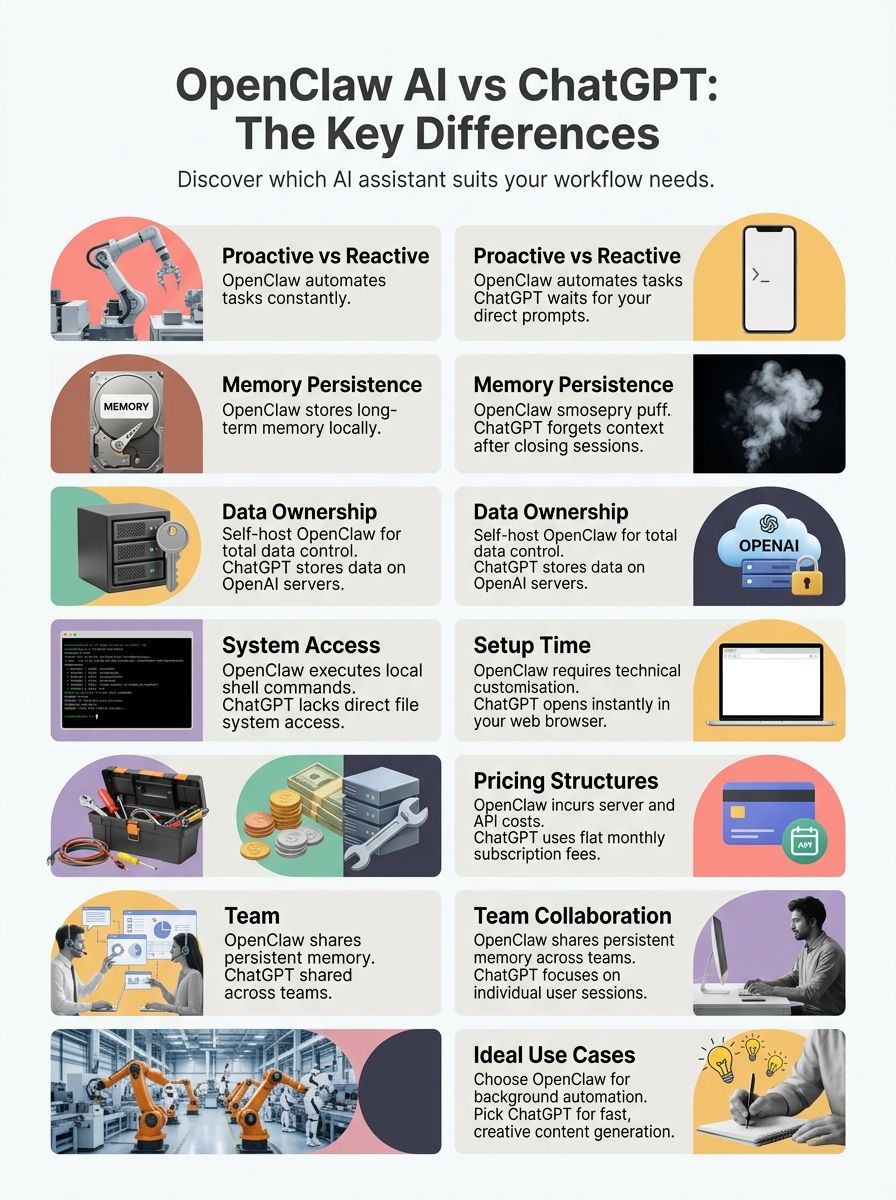
OpenClaw AI operates independently to execute background automation tasks, while ChatGPT relies on direct user prompts to generate responses.
In early 2026, ChatGPT reached over 900 million weekly active users globally. This makes it the standard for conversational intelligence. OpenClaw targets a different market, often running 24/7 on local hardware like the $499 Apple Mac mini.

How does proactive functionality in OpenClaw AI compare to ChatGPT's reactive nature?
OpenClaw AI is an autonomous agent platform that initiates tasks on a schedule, whereas ChatGPT waits for your explicit commands.
You can set OpenClaw to run daily email triage, send reminders, or execute shell commands on macOS mini devices. The system anticipates your needs. This technical configuration takes 30 to 60 minutes to establish.
ChatGPT provides rapid conversational intelligence for knowledge work. It now includes the OpenAI Operator tool. This Computer-Using Agent can fill out web forms and book flights automatically, but it still requires a user prompt to start the session.
Where is data stored and who owns it in OpenClaw AI versus ChatGPT?
OpenClaw AI stores all data locally on your device, giving you total ownership, while ChatGPT processes and stores your inputs on OpenAI cloud servers.
Every prompt you send to ChatGPT moves through a managed cloud product. OpenAI controls the storage and access. This closed infrastructure works well for general tasks but limits your control over sensitive company data.
“Storing persistent memory on local disk gives users complete ownership of theirfiles, drastically reducing the risk of third-party data breaches.”
OpenClaw AI saves activity logs directly to files like SOUL.MD. This direct access requires strict security measures. Keeping data off the cloud helps organizations meet internal privacy guidelines.
What built-in tools and accessibility features does each platform offer?
Both platforms provide distinct built-in features to speed up your workflow. The table below outlines their specific capabilities.
| Feature | OpenClaw AI | ChatGPT |
|---|---|---|
| System Access | Direct access to operating system; reads files and runs shell scripts locally | No direct file system or command-line access |
| Messaging Integration | Connects natively with Slack Bolt API, Discord, and Telegram webhooks | Web interface and official mobile apps |
| Skill Library | Over 4,000 automation skills available via ClawHub | Operator CUA (Computer-Using Agent) for web tasks |
| Web Automation | Script-based web automation for repositories and logs | Operator tool for form filling and visual web navigation |
| Context Memory | Persistent memory stored in localfiles | Multi-turn conversations within a fixed context window |
| Access for Teams | Team collaboration features with shared workflow logs | Primarily created for individual use; Team workspaces available |
| Setup & Accessibility | Requires terminal configuration and local hardware | Instant access in under two minutes via web browser |
How do memory capacity and long-context handling differ between the two?
OpenClaw AI uses local files to remember context indefinitely, while ChatGPT holds memory only within active conversational sessions.
ChatGPT relies on a fixed token context window. The GPT-4o model processes up to 128,000 tokens per session. Once you exceed this limit, the model begins to forget earlier instructions.
OpenClaw bypasses token limits by reading and writing to localfiles. This file-based memory allows it to maintain precise guidelines for ongoing team collaboration projects over months or years.
| Aspect | OpenClaw AI | ChatGPT |
|---|---|---|
| Memory Persistence | Stores all memory persistently on disk. Maintains context for weeks or longer. Supports multi-step automation that extends over time. | Operates mainly with session-based memory. Short-term context may carry over, but only within a session. Resets context after inactivity or when starting a new session. |
| User Control and Inspection | Users can inspect and manage memory directly. Memory files like SOUL.MD, MEMORY.MD, GOALS.MD, AGENTS.MD, and KNOWLEDGE.MD are accessible. Full control supports persistent workflows and team collaboration. | No direct access to memory storage or retention settings. Users cannot inspect, edit, or export session data. Provides limited visibility in memory management. |
| Long-Context Handling | Remembers detailed instructions, goals, and changes for extended periods. Workflow context remains intact for ongoing projects and team use. Suitable for persistent workflow automation and agent collaboration. | Short-term context is limited to the current session. Forgets prior interactions after session ends or after inactivity. Unsuitable for extensive, ongoing projects needing lasting memory. |
| Memory Structure | Usesfiles: SOUL.MD, MEMORY.MD, GOALS.MD, AGENTS.MD, and KNOWLEDGE.MD. Organises information clearly for users and teams. | Relies on temporary hidden memory. No visible structure or export features. |
| Team Collaboration | Persistent memory aids team projects. Context is shared across agents and users. Suitable for long-term group work. | Each session is individual. No memory continuity for teams. Lacks integrated support for collaborative context. |
OpenClaw AI Compared to Other AI Tools
OpenClaw AI prioritises reliable, scheduled task execution, giving it a distinct advantage over experimental agents like AutoGPT.
AutoGPT uses goal-driven recursive reasoning to explore complex problems. It reached over 183,000 GitHub stars by early 2026. OpenClaw AI provides structured background automation, and it pairs perfectly with AutoGPT to combine advanced reasoning with dependable task delivery.
How does OpenClaw AI compare to AutoGPT in terms of power and capability?
OpenClaw AI executes defined workflows with high accuracy, whereas AutoGPT excels at open-ended reasoning and research.
| Feature | OpenClaw AI | AutoGPT |
|---|---|---|
| Core Design | Structured automation. Deterministic with reliable task execution. | Iterative, goal-driven. Suited for adaptive, recursive reasoning. |
| Execution Approach | Consistent, always-on. Runs locally or on user infrastructure. | Operates with autonomy. Often cloud or hybrid-based. |
| Governance & Control | Strong on compliance. Persistent, inspectable memory for audit. | Limited audit options. Memory not usually persistent or structured. |
| Workflow Management | Ideal for business automation. Ensures reliability and control. | Excels in research and experimentation. Handles evolving tasks well. |
| Power & Capability | Executes workflows with high accuracy. Suits scenarios needing oversight. | Handles complex reasoning chains. More flexible but less predictable. |
| Tool Integration | Focuses on structured automation tools. Seamless integration into existing systems. | Leverages wide range of AI tools. More open-ended and experimental. |
| Use Case Example | Finance team automates approval flows while maintaining full audit trails. | Research group tasks the system with exploring novel solutions to ongoing challenges. |
| Memory Handling | Persistent, can be inspected and retained for compliance. | Usually does not retain memory between runs. Suits short-term tasks. |
| Layered Collaboration | Often pairs with AutoGPT. Handles reliable execution under AI reasoning guidance. | Can orchestrate reasoning, with OpenClaw ensuring dependable task delivery. |
Use Cases: When to Choose OpenClaw AI
Choose OpenClaw AI when you need constant background automation on dedicated hardware.
Many developers use the Apple Mac mini equipped with the M4 chip to host these agents. The 16GB of unified memory handles complex shell command execution efficiently.

When should you use OpenClaw AI for autonomous task execution?
OpenClaw AI is the best choice for processes that require uninterrupted, 24/7 operation without human supervision.
- Use persistent automation for repetitive knowledge work, such as daily report creation or email triage.
- Choose this platform when agents require ongoing access to local files and repository management within the Apple ecosystem.
- Opt for self-hosting whenever data privacy and compliance demand total control over memory retention.
- Rely on OpenClaw to run 24/7 for scheduled checks and background automation using true on-device intelligence.
- Integrate with platforms like Slack if seamless team collaboration is required for process delegation.
- Use OpenClaw when handling multi-step sequences that require complex API calls and local script execution.
- Ensure teams managing sensitive operations meet strict security standards by keeping workflow logs entirely offline.
How can OpenClaw AI enhance workflow automation?
OpenClaw AI manages repetitive jobs by monitoring logs and triggering actions across multiple applications simultaneously.
It performs complex email triage and calendar management without waiting for commands. The agent uses real access to files to organize data or execute scripts locally. Teams at companies like MacPaw use this capability for log monitoring.
- Generates daily project summaries automatically based on local file changes.
- Triggers API calls to update internal team dashboards in real-time.
- Executes terminal commands to restart failed server processes without human intervention.
What team collaboration features does OpenClaw AI provide?
OpenClaw AI integrates directly with messaging apps to create a shared command center for your entire team.
You can connect the platform to Slack or Discord using secure webhooks. This setup allows multiple users to trigger workflows from their usual chat windows. The system provides shared memory files.
“By integrating AI directly into team chat, OpenClaw turns individual automation into collaborative, algorithm-driven monitoring.”
Team members can inspect logs for compliance or review the reasoning behind a specific automated decision. Experts like Peter Steinberger and Jensen Huang emphasize the value of this transparent setup for large-scale operations.
Use Cases: When to Choose ChatGPT
ChatGPT is the clear choice for fast content creation, brainstorming, and on-demand problem-solving.
It requires zero local installation. You get immediate access to top-tier foundation model capabilities directly in your browser.
When is ChatGPT best for conversational interactions?
ChatGPT excels when you need instant, interactive answers to specific questions.
- Users choose ChatGPT for quick Q&A sessions, receiving intelligent answers in under five seconds.
- The cloud interface supports ongoing chats without the need for any local technical configuration.
- Writers, students, and professionals rely on it for rapid content generation and brainstorming.
- It allows users to discuss complex technical topics and test algorithms securely via API calls.
- The OpenAI Operator feature automates conversational web tasks, handling bookings and online shopping without coding skills.
- Models like GPT-4o and Claude Opus ensure high-quality interactions for planning events or reviewing data.
How does ChatGPT support creative content generation?
ChatGPT provides a highly interactive canvas for drafting, editing, and refining written material.
Writers and students use it to summarize literature or draft reports. The new canvas mode allows users to highlight specific paragraphs and ask the AI to rewrite them for a different tone. This adaptive approach fits various communication styles beautifully.
“The ability to adjust tone in real-time makes ChatGPT an indispensable partner for creative professionals seeking rapid content generation.”
It supports deep model flexibility. You can prompt the AI to act as a harsh critic or a creative collaborator, helping you iterate on ideas much faster than traditional editing.
Why is ChatGPT simpler to integrate for individual users?
ChatGPT eliminates the need for any technical configuration or hardware investment.
Setting up a local agent can take four to eight hours. You can create a ChatGPT account and start chatting in under two minutes.
- OpenAI manages all the infrastructure behind the scenes.
- You never have to worry about security patches, software updates, or server uptime.
- This makes it the ideal personal assistant for users without system administration experience.
Key Advantages of OpenClaw AI
OpenClaw AI offers unmatched flexibility for technical users who want complete control over their automation environments.
The platform supports extensive customisation through open-source plugins and direct system access.
What customisation options make OpenClaw AI stand out?
OpenClaw AI allows you to shape the agent's exact behavior and capabilities using local configuration files.
- Personal agent personalities are set up usingfiles like SOUL.MD, creating a unique AI assistant for every user.
- Model selection supports Claude Opus, GPT-4o, Gemini 2.5, or even local models through Ollama.
- Over 4,000 skills on the ClawHub marketplace can be installed as TypeScript plugins.
- Extensive filesystem access allows direct management of local files and background automation.
- Integration with more than 12 messaging apps means you connect your AI agent to your real communication channels.
- Multi-tool orchestration lets teams combine email triage with calendar checks in one single automated motion.
How does OpenClaw AI's tool integration benefit users?
OpenClaw AI consolidates multiple external services into a single, automated workflow.
With thousands of skills available, you can connect the agent to almost any digital tool. It handles email triage, calendar management, and repository syncing seamlessly. The system supports the ahsk protocol and Apple technical notes like TN3193 for deep macOS integration.
“Keeping sensitive API calls within a private server environment drastically reduces external security risks for enterprise teams.”
This level of access lets technical teams automate scripts with zero barriers. Industry figures like James Reagan from CNET and Macy Meyer highlight how this localized multi-tool orchestration protects sensitive corporate data.
Key Advantages of ChatGPT
ChatGPT provides the most accessible and polished conversational experience available today.
Its intuitive design removes the learning curve entirely, allowing anyone to benefit from advanced artificial intelligence immediately.
What makes ChatGPT's interface user-friendly?
The platform features a clean, distraction-free layout that focuses entirely on your conversation.
Multi-turn conversations feel natural. The system maintains context effectively across dozens of messages, ensuring high response coherence.
- Voice mode latency is down to roughly 320 milliseconds, mimicking human response times perfectly.
- Personalisation features let you set custom instructions for all future conversations.
- Users like David Sacks, Andrej Karpathy, and Elly use these settings to guarantee the AI always responds in their preferred format.
How does ChatGPT offer broader accessibility?
ChatGPT is available on nearly every device with an internet connection, breaking down geographic and technical barriers.
The mobile app has reached tens of millions of downloads across iOS and Android platforms. ChatGPT operates seamlessly across desktop browsers and dedicated apps, syncing your Gmail inquiries instantly. This widespread availability means you can access research-grade intelligence from anywhere.
“Open access to powerful foundation models has democratized artificial intelligence, bringing expert-level analysis to students and professionals worldwide.”
It provides instant translation and language support for global teams. It requires no specialized hardware, making it accessible to anyone with a smartphone.
Cost and Setup Considerations
The financial investment and setup time for these tools vary drastically based on your technical requirements.
ChatGPT operates on a straightforward subscription model, while OpenClaw AI involves varying hardware and hosting expenses.
How do pricing models compare between OpenClaw AI and ChatGPT?
ChatGPT offers fixed monthly subscriptions, whereas OpenClaw AI involves varying hardware and hosting expenses.
| Platform | Pricing Model | Estimated Monthly Cost |
|---|---|---|
| ChatGPT Plus | Fixed Subscription | $20 / month |
| ChatGPT Pro | Fixed Subscription | $200 / month |
| OpenClaw AI (Local) | Hardware Investment | $0 (After Mac mini purchase) |
| OpenClaw AI (VPS) | Cloud Hosting | $5 to $70+ / month |
The $200 ChatGPT Pro tier gives users unlimited access to the o1 pro mode and advanced error correction features. This flat fee is highly predictable for budgeting and ideal for heavy research tasks.
OpenClaw AI is free under the MIT licence. Running it on a 32GB RAM VPS from providers like DigitalOcean costs around $60 to $70 monthly. Many users prefer buying a $499 Apple Mac mini for a one-time hardware cost, eliminating monthly cloud fees entirely.
What is the setup complexity for each tool?
ChatGPT offers instant access, while OpenClaw AI requires significant technical expertise to deploy.
You can open ChatGPT in your browser and begin working instantly. There are no command-line interfaces or system permissions to configure.
“Self-hosted agents require you to act as your own system administrator. You are responsible for every security update and server maintenance task.”
OpenClaw AI demands four to eight hours of initial setup. You must configure model selection, connect communication channels, and establish local security protocols. This complexity is a barrier for casual users but provides the exact control that power users like Alex Rozdolskyi and Teodor Tudor require for advanced delegation skills.
Conclusion
Choosing between OpenClaw AI and ChatGPT depends on your technical skills and daily requirements.
If you need an AI assistant that recalls past actions and executes background automation on a local device, OpenClaw AI is the superior choice. Its persistent memory gives you complete control over your files.
If you prefer instant answers and zero setup, ChatGPT provides the best conversational intelligence available. It requires no hardware and works seamlessly across all your devices.
FAQs
1. What is the main difference between OpenClaw AI and ChatGPT?
The main difference in the openclaw vs chatgpt debate is that OpenClaw functions as a proactive ai assistant using persistent memory to retain your context continuously. This allows it to handle advanced background automation tasks autonomously, whereas ChatGPT generates real-time responses without storing local, long-term memory.
2. How do OpenClaw AI and ChatGPT handle data privacy and security risks?
OpenClaw prioritises data privacy by keeping your interaction history and sensitive tasks like email triage completely local on your machine. In contrast, ChatGPT manages security risks by relying on a server-side token context window, which limits the exposure of your private details but requires sending data to the cloud.
3. Can both OpenClaw AI and ChatGPT be used as an ai assistant or agent for workflow automation?
Both platforms serve as excellent tools, but OpenClaw excels as an autonomous ai agent for workflow automation because its model flexibility allows it to execute multi-step tasks directly on your device.
4. Who are some notable figures associated with these technologies?
Austrian developer peter steinberger created OpenClaw, which CNET writer macy meyer recently highlighted as a revolutionary leap for personal AI. The broader computing field also includes hardware innovators, from researchers at the University of Texas at austin achieving milestones in quantum advantage, to engineers optimising current constraints. For instance, Apple's tn3193 documentation outlines a strict 4096-token limit for on-device models, showing the practical challenges developers face today.
5. Which platform offers greater adaptability through api calls and technical setup?
OpenClaw offers unparalleled adaptability through direct api calls and advanced technical configuration, letting you build custom directories to manage your specific workflows. Meanwhile, ChatGPT provides a simpler, out-of-the-box interface but restricts the deep backend customisation that advanced developers often require.
References
- https://devopscareers.substack.com/p/openclaw-vs-chatgpt-why-everyones
- https://lumadock.com/tutorials/openclaw-vs-chatgpt-key-differences (2026-01-22)
- https://rentamac.io/openclaw-vs-chatgpt/ (2026-02-20)
- https://www.hireoverseas.com/blogs/openclaw-vs-autogpt
- https://pmc.ncbi.nlm.nih.gov/articles/PMC11582041/
- https://www.sciencedirect.com/science/article/pii/S0268401223000233
- https://www.sciencedirect.com/science/article/pii/S266734522300024X
- https://pmc.ncbi.nlm.nih.gov/articles/PMC10623159/
- https://pmc.ncbi.nlm.nih.gov/articles/PMC12597148/